At the piano
Enter notation from a MIDI keyboard, practise either hand with the other accompanied, compare recorded takes, and follow chord changes with guide tones.
Connect your keyboard → cadence
A music-learning studio for Mac
Turn the pieces you want to play into a personal path for learning them.
Bring a score. Hear how it works, practise what trips you up, and write something of your own. Cadence connects your ears, your instrument and music theory in one free Mac app.
Public preview 0.36.1 · macOS 14+ · Piano & guitar
Free & open source · No subscription · Optional AI with your own key
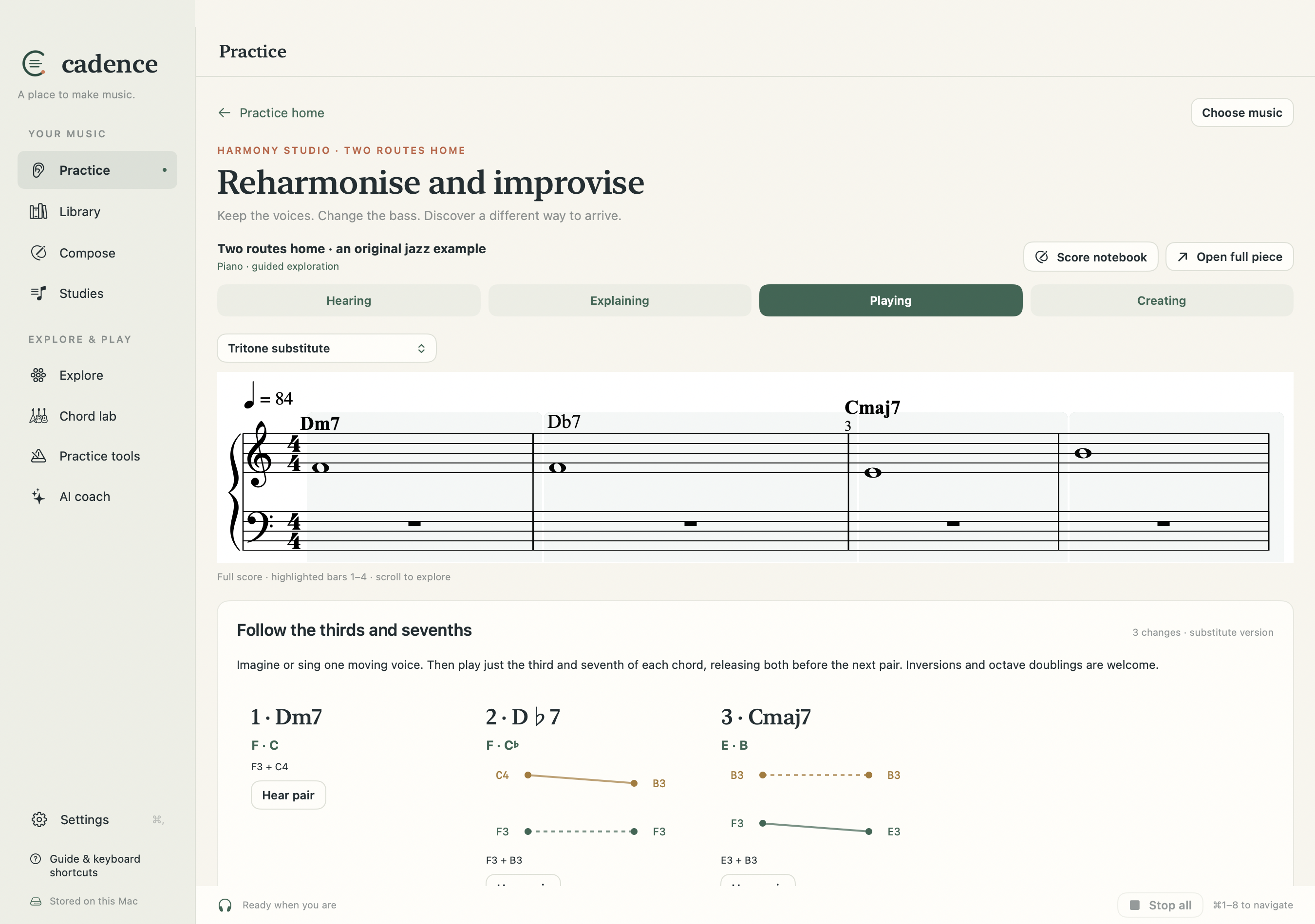
Keep the upper voices. Change one bass note.
Upper voices Same pitches in both versions
Bass The note that changes the colour
G falls a fifth to C. Above it, B stays put and F resolves to E.
Choose a route and press play. Use Bass only to isolate the change.
Start with music, stay with music
A difficult passage becomes the next thing to work on. Cadence connects an opening attempt, focused practice and a later independent return—while keeping the full score in view.
Open a score, review a PDF transcription, or build lessons from a book chapter.
Loop the tricky bars. Hear the harmony. Practise one hand, a rhythm or a chord change.
Return without hints, revisit it with spaced review, then use the idea in your own music.
Knowing has more than one sound
Naming a chord and anticipating its sound are different skills. Cadence keeps them separate, so a good answer in one area doesn’t hide a difficulty in another.
Imagine a phrase before playing. Sing intervals with solfège. Compare two ways a chord can resolve.
Explore keys, modes and harmony. Add your own score analysis, including alternative readings.
Use MIDI piano input or a guitar fretboard. Slow down, isolate a difficulty, then return to the phrase.
Write an answer, change an ending or record a MIDI improvisation. Save it beside the music that inspired it.
Two instruments. Many ways in.
Enter notation from a MIDI keyboard, practise either hand with the other accompanied, compare recorded takes, and follow chord changes with guide tones.
Connect your keyboard →See scales and modes in your tuning. Explore chord shapes, move triads through inversions, and connect what you hear with the fretboard.
Explore guitar practice →Bring what you’re learning
Import MusicXML. Turn selected PDF pages into an editable draft with optional AI, reviewing it beside the original. Use an EPUB or PDF chapter to build source-linked lessons and playable exercises.
Use your own OpenRouter account when you want explanations or transcription. The everyday practice tools work without it.
How importing and review work →A shared instrument
Cadence is free and copyleft. Read the code, suggest a better exercise, fix a bug, translate a lesson, or make your own version. Learning software should be something we can improve together.
The app is growing. AI transcription needs review; MIDI timing needs calibration on your setup. The download is Developer ID signed and Apple notarised.
Read the guide before your first session →